
Using simulated shoppers to find what to test
Most brands haven't got the traffic to test everything. Simulated shoppers are a cheap way to work out what's actually worth testing.

Most CRO advice assumes you’ve got traffic to burn. Run a test on 10,000 users, wait for significance, then implement the change.
That’s fine if you’re doing tens of thousands of sessions a week but not if you’re a £1-5m brand. You run a test, the numbers wobble, and you’re never quite sure whether it did anything or the week was just quiet.
So most smaller brands do one of two things. They freeze, because they can’t prove anything, so they change nothing. Or they guess, ship a redesign everyone in the room liked and call it a win because the meeting went well.
There’s a third option, and it starts by pulling apart two jobs people tend to blur together.
Finding is not proving
Finding out what’s wrong with a page and proving that a fix works are two different exercises, and they need completely different amounts of traffic.
Proving needs volume. To trust that a change actually lifted conversion rather than caught a good week, you need more traffic than a smaller brand can usually gather quickly, often weeks or months per test. There’s no clever way around it, that’s just how the statistics work.
Finding out what’s wrong needs very little. As the Nielsen Norman Group put it:
If one person falls down a pothole you know you need to fill it in, you don’t need a hundred more to fall down it first.
A handful of honest observations will surface most of the outright faults on a page.
The catch is that not everything is a pothole. A search that returns nothing is a genuine fault, and one shopper hitting it is proof enough. Whether a different layout converts better isn’t a fault, it’s a preference, and preferences still need the volume to settle.
So the traffic problem in CRO is really a proving problem. And you don’t want to spend the little traffic you have proving fixes for problems you haven’t even found yet. The smart move is to make the finding stage as rich as you can before you spend a single session testing.
Where simulated shoppers come in
This is what tools like SimGym are for. You point them at your site and they run a crowd of simulated shoppers through it, each with a persona and a goal, and report back on where they got stuck. It’s the finding stage, at a scale you’d never reach by recruiting real testers.
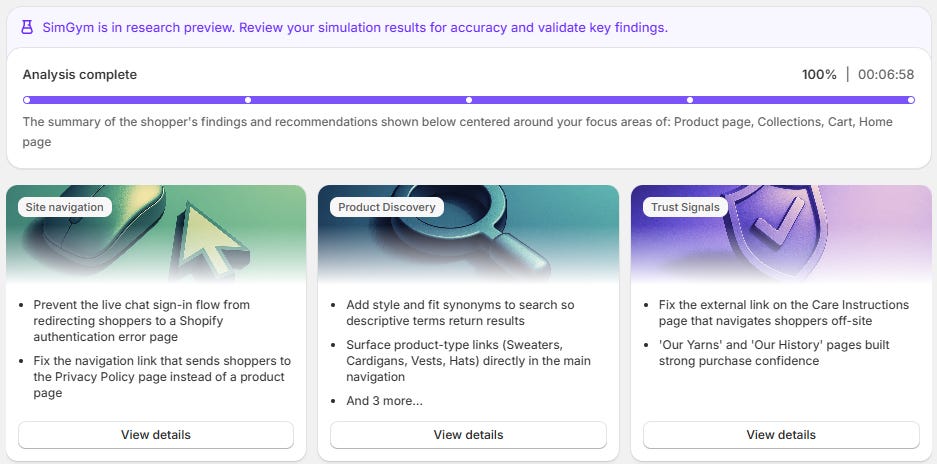
I ran one recently on a site we’d relaunched a couple of months ago. Internally everyone was happy with it (which is sometimes the trap as you can go a bit blind to your own site).
And it surfaced things we’d stopped being able to see. Search for a material like “cotton” and nothing came back, even though we stock plenty of it, because the fibre wasn’t in the product titles, so the search index never showed it (the same naming problem I wrote about last week).
It found dead ends in product discovery, a live chat that wasn’t pulling its weight, and searches like “oversized” and “sleeveless” that clearly wanted to be navigation, not just search terms.
The output is a hypothesis list, not an answer
The tool brings the volume. You bring the judgement.
Here’s the part that matters, and the part the tool won’t do for you. What you get back is a one-page summary and a pile of shopper feedback. That’s not a to-do list. It’s a list of candidates, and some of them are wrong.
So the judgement is in the triage. I took the raw feedback, checked every flag against the live site, threw out the noise and turned what was left into a board of tests, each with one metric it’s meant to move. That’s the bit worth doing.

A simulation that spits out twenty ideas is only useful once you’ve decided which five are worth your traffic, and in what order.
Two that came out of that one run:
Adding fibres and synonyms to titles and tags, so materials surface in internal search. Primary metric: search-to-PDP rate.
Forcing customers to actively choose a size before it goes in the basket, after the run flagged wrong sizes being added. Primary metric: wrong-size return rate.
Neither is a guess any more. Each is a specific change with a specific number attached, ready to run one at a time.
That board is nothing clever, a row per test, one metric each, ranked by priority. If it’s useful, here’s the blank version to copy.
Where it stops
A simulated shopper is a starter for ten, not a replacement for a real one. The research being built in this area, including work out of Amazon on using LLM agents for usability testing, frames it the same way: something you run before the real human study to sharpen it, not instead of it. Even the people building these tools are careful on that point.
So use it to fill the top of your testing funnel cheaply. Then still do the things it can’t. Watch a real person use the site and stay quiet while they struggle. Send a short survey. Ring two or three of your best customers and just listen. That’s where the why lives, and the why is the thing a simulation is only ever guessing at.
The tool isn’t really the point. The discipline is: separate finding from proving, spend your scarce traffic only on proving, and never let the tool decide what’s worth proving. It won’t turn a small site into a big one. But it does mean the little traffic you have gets spent on your best ideas, not your loudest ones. Which, for most smaller brands, is the whole game.
The pothole line is the part that transfers furthest, because it holds on the technical side too and almost nobody applies it there. A collection page with no H1, or a title repeating across forty pages, is a pothole. One look settles it. Whether a different layout converts better is a preference, and preferences need traffic nobody at that size has.
Where I would extend it is that a simulated shopper only sees what a shopper sees. The cotton example is the clean version of that limit. The search failed, so it surfaced. The same missing word costs you the Google query too, and no persona will ever find that one, because nobody in the simulation types anything into Google.
There is usually a reason the words are missing in the first place. Of 197 stores I reviewed this summer, 62 were selling with the manufacturer's product description word for word, so the copy on the page is the supplier's vocabulary, not the customer's. Your fibres and synonyms test fixes the search box and that problem in the same edit, whether it was framed that way or not.
Do you run a technical pass alongside a simulation like this, or keep them separate so the test board stays about behaviour?