
Using AI to customise your store (without breaking it later)
AI is brilliant for small theme tweaks, but without structure, problems quickly crop up.

AI coding tools are already mainstream. The 2025 Stack Overflow Developer Survey found 84% of developers are already using or planning to use AI tools in their workflows.
The difference is that good developers have processes around version control, staging environments and documentation.
I’ve had to help a handful of clients fix Shopify sites recently that used ChatGPT to make theme changes.
Someone asks it to tweak some styling, add functionality or build a small feature.
It gives them some code, they paste it into the theme, and it works… until it doesn’t.
Usually the problem appears months later. The theme gets updated, something breaks, or a developer needs to work on the site, and no one can explain what was changed or where the code came from.
The issue isn’t AI itself, it’s how casually it’s being used.
For context, I’m not a developer. I know enough HTML & CSS to get myself into trouble, and occasionally out of it again, but anything touching core theme files usually gets a second opinion from a freelance developer friend.
Frictionless AI coding
AI has removed much of the friction and cost of writing code.
What it doesn’t do is remind you to document what you’ve just changed.
ChatGPT is extremely confident, even when it’s wrong. If you don’t understand what the code is doing, that confidence can be misleading.
I’ve seen people use AI to optimise theme files to improve speed, without realising they’re editing parts of the theme that will be overwritten the next time the developer updates it.
There’s no record of the change.
No notes explaining what the code does.
No way to trace where it came from.
Six months later, someone is trying to untangle it.
If you’re going to use AI for development work, structure matters
The easiest way to introduce structure and basic guardrails is to use Projects (in ChatGPT or Claude) or Gems in Gemini, rather than starting a new chat every time.
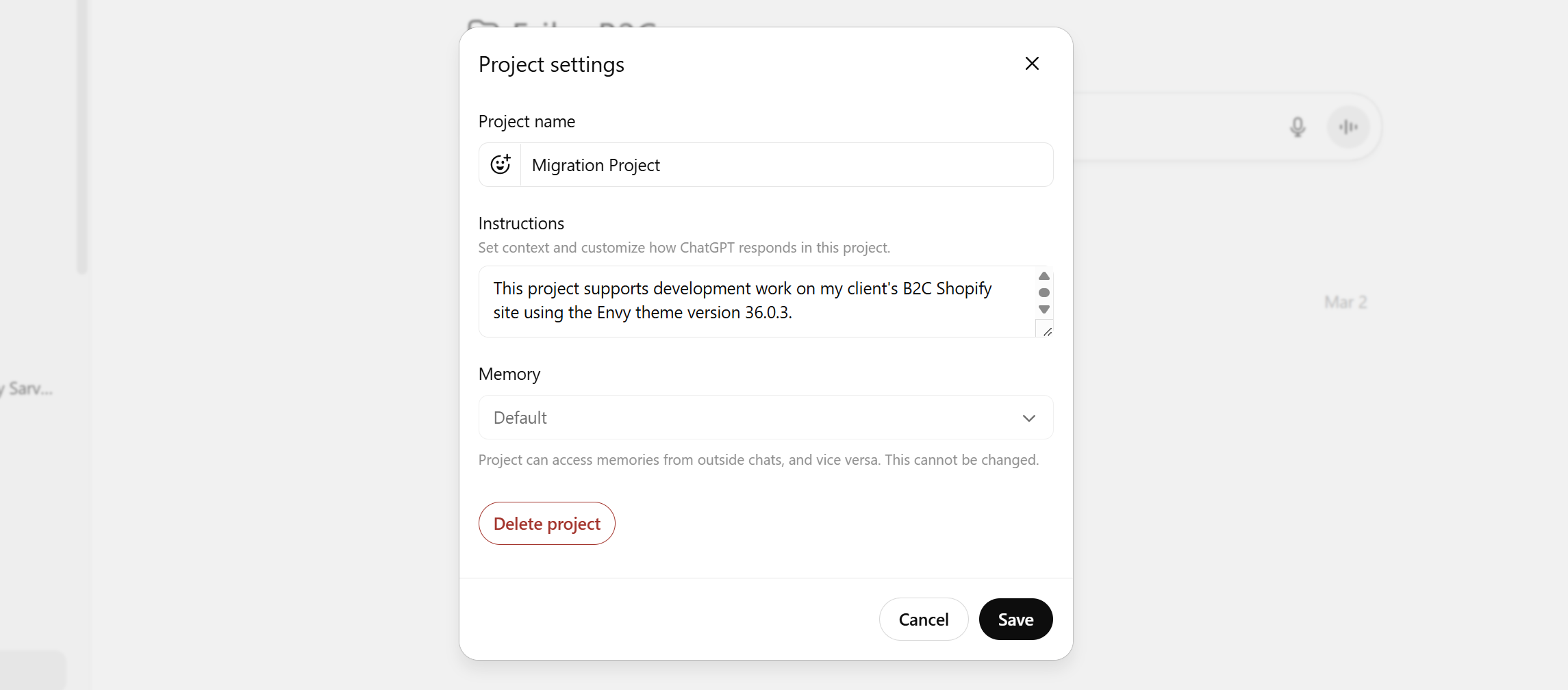
Inside the project instructions, I usually define a few basics:
The Shopify theme and version
Links to the theme documentation
The scope of the project
Guardrails around what the AI can change
For example, I explicitly tell it:
Prefer additive changes over modifying existing theme logic.
This alone avoids a lot of the common mistakes.
I’ve included the instructions I use at the end of this issue for you to steal.
Keep a record of what AI creates
One golden rule I add to all project instructions:
All code must be annotated with my name, the date and a brief note on what the code does.
For example:
<!-- Ian Ferguson | 6/11/25 | Countdown timer block for Black Friday promotion -->It takes a few seconds, but it solves a common problem.
Six months later a developer can open the file and immediately understand why that code exists.
And I can apologise for how messy it is (hey, it did the job).
The types of changes AI is good for
AI is genuinely useful for certain types of development work.
Small, contained pieces of functionality.
For example, during Black Friday last year, I used ChatGPT to create a simple countdown widget.
The code sat inside a custom Liquid block with its own HTML and CSS. I added it to the product page template for the promotion.
When the sale finished, I removed the block. Simple.
No apps, no theme edits, nothing that would interfere with future theme updates.
That’s the kind of change I’m comfortable with.
Where people get into trouble is asking AI to rewrite core theme files.
A simple test before deploying AI-generated code
Before putting any AI-generated code live, ask one question:
If this breaks the site tomorrow, would we know exactly what changed and how to undo it?
If the answer is no, stop and fix that first.
Add documentation.
Move the code into a new snippet.
Or get someone who understands it to review it.
AI can make development faster.
But faster doesn’t remove the need for structure.
This week’s takeaway
AI can be an awesome development assistant.
Just remember, the real risk isn’t bad code.
It’s deploying code no one understands.
Saving a bit of developer time isn’t worth it if the site breaks and sales stop.
If you’re going to use AI to customise your store, learn how to deploy changes properly, keep a record of what you change and know how to roll it back.
And as promised, here’s the template I start with.
This project supports development work on a Shopify store using the [Theme Name] theme version [X.X.X]. The live site is [store URL]. Follow the official theme documentation at [theme documentation link].

Support theme level development using Liquid, CSS and JavaScript while considering UX, CRO, SEO, performance and maintainability.

Always prefer additive changes over modifying core theme logic. Use new snippets, sections, app blocks or custom CSS where possible. Avoid editing core theme files unless absolutely necessary and clearly flag when a change may be overwritten by a future theme update.

Assume the theme will be updated regularly. Minimise edits to base templates and core files. Extend functionality through snippets, sections and settings rather than rewriting existing code.

All structural changes must preserve URL structure, schema integrity, heading hierarchy, internal linking and crawl paths. If a request risks creating duplicate content, breaking structured data or impacting SEO, clearly flag the risk and suggest a safer alternative.

Prioritise native Shopify functionality and assume Shopify Markets, localisation and apps may be active. Flag any code that could conflict with these.

All code output must be production ready, clean and readable. Do not provide pseudocode. Annotate all code with [Name], the date and a short description explaining what it does.

Assume basic coding knowledge. Be concise and technical. Recommend the safest long term approach first and explain any trade offs briefly.

Prioritise performance, accessibility and long term maintainability over quick visual fixes.